
Буфер обмена Clipboard
История текста и картинок с поиском и закреплением. Клик вставляет запись в окно, где ты печатал. A history of text and pictures with search and pins. A click pastes an entry into the window you were typing in.

Жидкая чёрная пилюля вверху экрана. Показывает, что происходит прямо сейчас: музыку, загрузки, таймер, вопросы ИИ-агента. По клику раскрывается в набор инструментов. A liquid black pill at the top of your screen. Shows what is happening right now: music, downloads, timers, terminal AI prompts. Click it to expand the toolkit.
Примеры событий в островеExamples of island events
Нажми на пилюлю, чтобы открыть музыку, буфер, заметки и управление. Раскрытие по наведению включается в настройках. Персонажи реагируют на курсор; свёрнутый остров оставляет фокус в текущем окне. Click the pill to open music, clipboard, notes and controls. You can enable hover expansion in settings. Characters react to your pointer; the collapsed island keeps focus in your current window.
История текста и картинок с поиском и закреплением. Клик вставляет запись в окно, где ты печатал. A history of text and pictures with search and pins. A click pastes an entry into the window you were typing in.
Брось файлы на остров, и они подождут, пока не вытащишь их в нужное окно. Drop files on the island, and they wait there until you drag them into the right window.

Программы, файлы, калькулятор, курсы валют, «таймер 10 мин» и «напомни позвонить маме завтра в 9». Programs, files, a calculator, currencies, “timer 10 min” and “remind me to call mom tomorrow at 9”.

Подключи свой ключ или локальную Ollama. Прикладывай картинки и текст из PDF, Word, Excel и PowerPoint. Доступ к моделям зависит от выбранного провайдера. Connect your own API key or local Ollama. Attach images and text from PDF, Word, Excel and PowerPoint. Model access depends on your provider.

Заметка с форматированием и папками, таймер прямо в пилюле и напоминания одной фразой: «таблетки каждый день в 23:00». A note with formatting and folders, a timer right in the pill and reminders in one phrase: “pills every day at 11 pm”.

Wi-Fi, Bluetooth, физический Ethernet, тема Windows и управление VPN. Для VPN нужны поддерживаемая служба или свои команды; GUI-клиенты можно открыть из панели. Wi-Fi, Bluetooth, physical Ethernet, Windows theme and VPN controls. VPN switching needs a supported service or your own commands; you can open GUI clients from the panel.

Выбери город, единицы и прогноз по часам или на неделю. Погода и поиск города требуют сети. Choose a city, units and an hourly or weekly forecast. Weather and city search need a network connection.

Тёмный, светлый или как в Windows. Размер острова от 80 до 200 % — для больших мониторов. Dark, light or as in Windows. The island from 80 to 200 % — for big monitors.

Подключи hooks Claude Code и Codex, чтобы видеть работу, ожидание и завершение. Для Claude можно ответить на запрос разрешения, выбрать один или несколько вариантов в вопросе. Connect Claude Code and Codex hooks to see work, waiting and completion. For Claude, reply to permission requests and select one or several answers to a question.
Демонстрация: ответь на запрос Claude или посмотри статусы Codex. Demo: reply to Claude or view Codex status notifications.
К прежним 25 добавились 11 авторских пиксельных питомцев — от лесного Кряжика до рыжего котёнка Искорки. Выбирай отдельного спутника для покоя и музыки. Ниже можно посмотреть новинки крупно и в пилюле. Eleven original pixel pets join the existing 25, from forest companion Kryazhik to ginger kitten Iskorka. Choose separate companions for idle and music. Explore the new arrivals at full size and in the pill below.
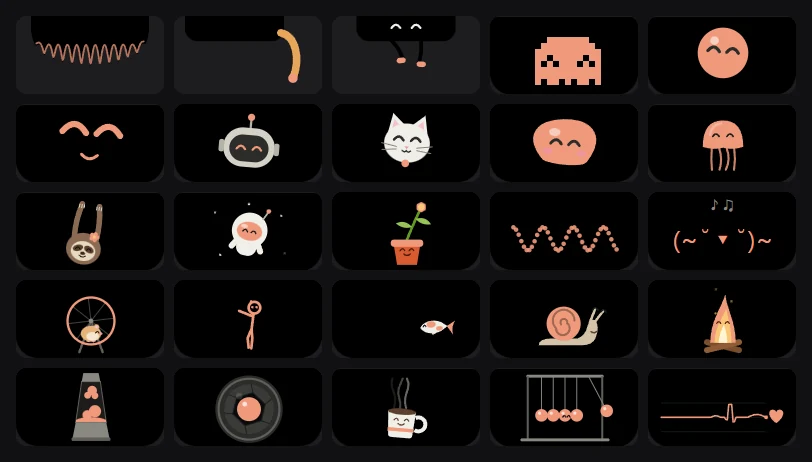
Выбери персонажа. Коснись крупного рисунка, чтобы он ответил.Choose a companion. Tap the large portrait to see its reaction.
Крупный вид и компактная пилюляFull-size portrait and compact pill
Ещё 9 питомцев можно импортировать локально, если они доступны в установленном Codex. Эти файлы остаются на твоём ПК; наличие зависит от установки Codex.You can also import 9 pets locally when they are available in your installed Codex. Those files stay on your PC; availability depends on your Codex installation.
Публичный выпуск для Windows 10/11 x64. Приложение не требует оплаты; внешние ИИ-сервисы используют твои ключи и тарифы. Скачай выпуск на GitHub. A public release for Windows 10/11 x64. The app has no subscription; external AI services use your keys and plans. Download the release on GitHub.
Woods IslandWoods Island
ВозможностиFeaturesв приложенииin the app
Обновления и надёжностьUpdates and reliability
1.2.0новое в сборкеnew in this build
Скачай Setup и запусти Woods Island через ярлык. WebView2 будет установлен при необходимости. Открой настройки из меню острова.Download Setup and launch Woods Island from its shortcut. WebView2 is installed if needed. Open Settings from the island menu.
Открой «Подключения»: музыка определяется через Windows; для Яндекс Музыки нужен коннектор, для OBS — WebSocket, для ИИ — твой ключ или Ollama. Hooks Claude/Codex требуют Node.js.Open Connections: music uses Windows media sessions; Yandex Music needs its connector, OBS needs WebSocket, and AI needs your key or Ollama. Claude/Codex hooks require Node.js.
Выбери питомца, размер острова и нужные модули. Если что-то не работает, проверь статус в «Подключениях» и приложи сведения диагностики к сообщению об ошибке.Choose a pet, island size and modules. If something fails, check Connections and attach its diagnostic details to a bug report.
1.2.0 · обновления, данные и настройки1.2.0 · updates, data and settings
Для перехода с 1.1.1 установи 1.2.0 через Setup. Следующие выпуски установленной копии доступны в «Настройки → Обновления»; автозагрузку можно отключить. Portable обновляется вручную: закрой остров и замени файлы из нового ZIP.To upgrade from 1.1.1, install 1.2.0 using Setup. Future updates for the installed app appear in Settings → Updates; automatic downloads can be disabled. Update Portable manually: close the island and replace the files from the new ZIP.
Что спрашивают чаще всего: про доступ, обновления, ИИ и данные. The most common questions: about access, updates, AI and your data.
У установщика пока нет цифровой подписи издателя. Windows SmartScreen может показать предупреждение. Проверь, что файл взят из выпуска Woods Island на GitHub, и сверь SHA256 перед запуском. The installer is not digitally signed, so Windows SmartScreen may show a warning. Check that the file came from the Woods Island GitHub release and verify its SHA256 before running it.
Windows 10 или 11, 64-разрядная архитектура x64. Windows 10 or 11, 64-bit architecture (x64).
В установленной версии 1.2.0 открой «Настройки → Обновления». Приложение проверит и скачает новый выпуск; после проверки подписи пакета нажми «Установить». Автозагрузку можно отключить. Для перехода с 1.1.1 сначала скачай Setup с этой страницы. Portable обновляй вручную после закрытия острова. In the installed 1.2.0 app, open Settings → Updates. The app checks for and downloads a new release; after the package signature check, choose Install. You can turn automatic downloads off. To upgrade from 1.1.1, download Setup from this page first. Update Portable manually after closing the island.
В Woods Island функции доступны без оплаты приложения. Для внешнего ИИ нужны твои ключи и тарифы; для Ollama нужны установленные локальные модели. Условия распространения указаны с каждой сборкой. Woods Island features have no app subscription. External AI services need your keys and plans; Ollama needs locally installed models. Distribution terms accompany each build.
Woods Island не продаёт ключи и не взимает абонентскую плату. Приложение работает по чистой модели BYOK (Bring Your Own Key): каждый пользователь подключает свой собственный бесплатный или платный ключ (Gemini, OpenAI, Groq, Anthropic), либо запускает бесплатные локальные модели через Ollama прямо на своём ПК. Ключи хранятся только локально в зашифрованном виде. Woods Island does not sell keys or charge subscriptions. The app works on a pure BYOK (Bring Your Own Key) model: you connect your own personal free or paid API key (Gemini, OpenAI, Groq, Anthropic), or run free local models via Ollama directly on your machine. Your keys stay on your computer, encrypted.
Буфер, заметки, чат и настройки хранятся локально. Ключи ИИ защищены Windows DPAPI. Погода, геокодирование, обложки и тексты песен используют внешние сервисы; запросы и выбранные вложения ИИ уходят настроенному провайдеру. Приложение может вести локальный диагностический журнал. Clipboard history, notes, chat and settings are stored locally. Windows DPAPI protects AI keys. Weather, geocoding, artwork and lyrics use external services; AI requests and chosen attachments go to your configured provider. The app may write a local diagnostic log.
В настройках можно включить скрытие острова для полноэкранных приложений и выбрать исключения. Нагрузка зависит от музыки, анимации и открытых инструментов; влияние на конкретную игру нужно проверить на твоём ПК. Enable hiding for full-screen applications and choose exceptions in settings. Resource use depends on music, animation and open tools; check its effect on your game on your own PC.